Ergonomic keyboard


An ergonomic keyboard is a computer keyboard designed with ergonomic considerations to minimize muscle strain, fatigue, and other problems.[2]
Features
The common QWERTY keyboard layout is credited to the mechanical typewriter designed by C. Latham Sholes and patented in 1878;[3] research indicates the layout may have been influenced by telegraph operators.[4] The offset in the columns between rows was designed to accommodate the physical links between each key and the internal mechanisms of the typewriter; as typing duties transitioned to electric (motorized) typewriters and then computers, the layout was retained to ease the transition for users that had already been trained to type. However, the legacy mechanical layout has numerous idiosyncrasies, including the staggered column layout, which can force the user into uncomfortable, repetitive movements and postures. Several potential solutions have been proposed since at least 1926.
Ergonomic keyboards, in essence, are created with the aim of minimizing discomfort in users' wrists and reducing unnecessary finger movements by rearranging or repositioning the keys. For instance, typing on a conventional keyboard layout can force the user into shoulder elevation, wrist ulnar deviation, and head rotation.[5]: 385 Consideration of physical ergonomics suggests the most relaxed typing position is one in which the keyboard user's forearms are parallel to the ground, with wrists held straight. To facilitate this posture, Klockenberg published a study in 1926 that suggested the primary key clusters for two-handed typists should be split into left and right halves which are set at an angle to each other, allowing the wrists to remain straight.[5]: 385 [6] A more detailed study was published in 1972 by Kroemer, suggesting that an adjustable split keyboard may reduce user pain.[5]: 386 [7] During the 1970s, several studies were published suggesting that data entry operators were at risk of developing musculoskeletal injuries.[5]: 387
Compact keyboard
_(51253001971).png)
Compact keyboards lack the numeric block which is rarely used. They are considered ergonomic[8] as it frees up space to the right side of the keyboard for better placement of the mouse. This reduces the outward rotation angle of the arm when switching to the mouse. They come in two main categories. While the ten key less (TKL) only omits the numeric block, the 75% layout[9] changes the placement of the arrow keys as well.
Compact keyboards should not be mixed with miniature keyboards which in addition have a reduced key cap size.
Split key clusters
Split keyboards group keys into two or more sections. By separating the keyboard, split keyboards typically change the angles and the distance between each section to ensure the user's wrists remain straight. There are four relevant parameters:[5]: Fig.2
| Configuration parameters |
|---|
.svg) |
.jpg) |
 |
 |
Ergonomic split keyboards can be fixed, where the user cannot change the relative angles and distance between the sections, or adjustable, which usually has two independent modules that allow these to be tailored exactly to the user. Fixed split keyboards are necessarily designed to accommodate a wide range of users, and can be set up rapidly to replicate a similar interface in different settings, but may not fit a specific user exactly. For example, people with broad shoulders may benefit from an adjustable split keyboard's ability to customize the distance between the two halves of the keyboard. This ensures the elbows are not too close together when typing.[10] On the other hand, adjustable split keyboards sometimes intimidate potential users, who may fear they may exacerbate or become more susceptible to repetitive strain injuries. Due to reduced tension people might tend to a more forward neck posture[11]; Fixed split keyboards like the Microsoft Natural have sold well in comparison.[12]
The angled split keyboard (sometimes referred to as a Klockenburg keyboard) is similar to a split keyboard, but the middle is tented up so that the index fingers are higher than the little fingers while typing. Key Ovation makes the Goldtouch ergonomic keyboard which is an adjustable angled split keyboard. On some ergonomic keyboards, the tenting angle is increased to 90° so the user types with their hands perpendicular to the ground, thumbs-up,[13] similar to the hand position adopted by accordion players.
- A variety of split keyboards evolved over time
-
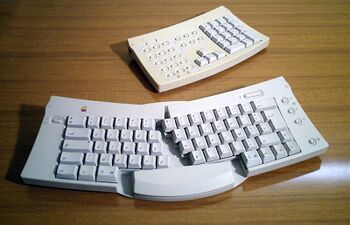 The Apple Adjustable Keyboard (1992) splits the alphanumeric keys into two halves with an adjustable opening angle
 -
 KeyTronic FlexPro and OEM ergoLogic (1993)
 -
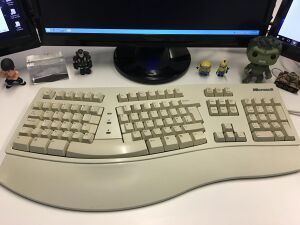 The Microsoft Natural Keyboard (1994) is a fixed split keyboard
 -
 IBM Adjustable Keyboard (Model M15, 1994) with a ball joint to control opening and tenting angles
 -
 Goldtouch (1997) adjustable split keyboard has a similar ball joint
 -
 The Kinesis Freestyle (2007) adjustable split keyboard linked by a cable and removable link; additional accessories are used to adjust tenting angle or attach a handrest
 -
 The Kinesis Free style allows fully splitting each key cluster
 -
 DIY keyboard with full split and compact layout


.jpg)
Vertical column layout
Because electric typewriters and computer keyboards no longer need to accommodate a mechanical linkage, the keys can be set in vertical columns without staggering, minimizing lateral finger movements when moving between rows, but increases the distance between the pointing finger neutral position to some of its secondary keys. This vertical layout rearranges the keys into linear columns. If the rows remain aligned horizontally, the resulting ortholinear layout puts the keys on an orthogonal grid.[14] Other designs use vertical columns with staggered rows to compensate for the difference in finger lengths. A keyboard with vertical columns can require an adjustment period as the user retrains their finger movements.[14]
Those keyboards combine often vertical or semi-vertical columns with split angle design. There it is easier to position the hand near perpendicular to the key rows. Examples of such types include the Truly Ergonomic keyboard,[15] ErgoDox,[16] ZSA Moonlander,[17] and Zergotech Freedom[18] keyboard.
- Variety of vertical column keyboards evolved especially from the DIY community
-
 An ortholinear keyboard, with keys arranged in an orthogonal grid with vertical columns
 -
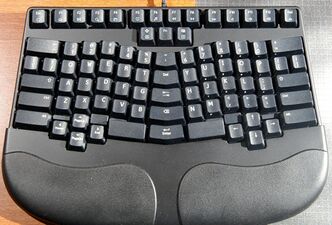 The Truly Ergonomic keyboard, which combines fixed-split design with staggered columns
 -
 ErgoDox, adjustable-split with staggered columns and thumb blocks


.jpg)
Contoured surface
The preceding split and vertical column keyboards arranged each key cluster onto a single flat plane. Contoured- or dished-surface keyboards like the Maltron (1977) or the newer Kinesis Advantage line (1992+) are fixed split keyboards with tenting that place the keys into two curved depressions set approximately at shoulder width.[19] The function keys, navigation keys, and modifiers such as , , etc. are set between the key groups for use with the thumbs. For these keyboards, the resulting bowl-like key surfaces are intended to minimize and make consistent the finger extension required to strike keys away from the home row.[20] In general, contoured keyboards also incorporate a vertical column layout with staggered rows for each hand. In this configuration, minimal movement of arms and wrists is required.[21]
Some keyboards combine vertical key columns and contoured surfaces with fully-adjustable (independent) split key clusters. Examples include the Kinesis Advantage 360,[22] Dactyl Manuform,[23] and MoErgo Glove80.[24] With a relatively small market, many are custom-built or sold as kits to be assembled by the user, with extensive customization options.
-
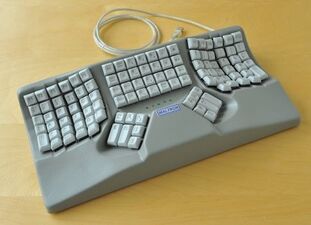 Maltron contoured keyboard with Malt Layout
 -
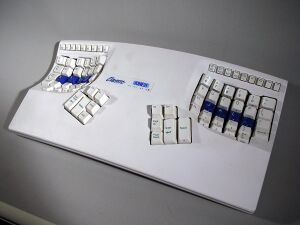 Kinesis Contoured Classic with QWERTY layout
 -
 Custom adjustable split contoured keyboard with vertical columns and staggered rows
 -
 The Kinesis Advanteage 360 combines contured keyboards with fully split characteristics


.jpg)

Vertical keyboard
Notably the SafeType keyboard might be a special case of split layout with the 90° tenting angle.
-
 The SafeType keyboard is a fixed split keyboard with a 90° tenting angle
 -
 Kinesis Freestyle with vertical Ascent clipped

.jpg)
Keyboard alternatives

A few ergonomic keyboards do not have the typical one key per letter, such as a keyer, chorded or a keyless ergonomic keyboard.[25] For example, DataHand eliminates the need for any wrist motion or finger extension; each finger has five separate switches triggered by buttons or paddles.[26]
Advances in speech recognition have made it possible to eliminate the use of a keyboard altogether, particularly on smaller devices that lack traditional keyboard interfaces.[27][28]
Handheld ergonomic keyboards are designed to be held like a game controller,[29] and can be used as such, instead of laid out flat on top of a table surface. They allow the user the ability to move around a room or to lean back on a chair while also being able to type in front or away from the computer.[30][31] Some variations of handheld ergonomic keyboards also include a trackball mouse that allow mouse movement and typing included in one handheld device.[32]
- Various alternatives
-
 An "AlphaGrip" Handheld Keyboard
 -
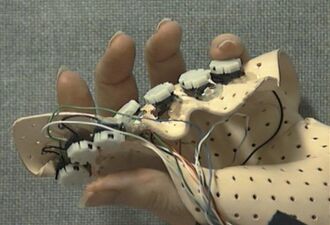 Handmade keyer with seven key switches, custom-molded for the left hand of a single user
 -
 Chair integrated keyboard
 -
 One hand keyboard
 -
 Veyboard (Velotype)
 -
 Specialized Japanese Keyboard as part of the TRON project


Considerations
 | This section possibly contains original research. (January 2026) (Learn how and when to remove this template message) |
It is widely claimed that an ergonomic keyboard may reduce muscle strain and reduce risk of carpal tunnel syndrome or other kinds of repetitive strain injury.[5][33][34][35] There are many factors leading to such conditions that appear only after extended use, making it challenging to isolate a single cause. An ergonomic keyboard alone doesn't make an ergonomic workplace. It requires the involvement of the user, the whole environment and the tasks being executed. But such keyboards fulfill general principles of ergonomics that advocate for comfortable posture with joints in neutral position to reduce general strain. There are indications, however, that that these are not well tolerated.[36] They break with existing user habits, differ from other workplaces and usually consume more desk space. For better user acceptance layout changes should be avoided, tenting and hand-rests should be optional and user preferences must be respected.
Narrow studies examining hand position at rest neglect many other possible factors. Ergonomic keyboards may only change the area of stress instead of eliminating it.[37]
See also
- List of repetitive strain injury software
- Keyboard layout
- Maltron
References
- ↑ 1.0 1.1 "An Evaluation of a Totally Split Compact Keyboard and its Impact on Posture, Discomfort, and Performance by Atlas Ergonomics". March 2010. https://kinesis-ergo.com/wp-content/uploads/Atlas-Ergonomics-Totally-Split-Keyboard-Design-March-2010-1.pdf.
- ↑ Michelle Manalo (April 5, 2007). "Blueprint for a healthy workstation". The Calgary Herald. http://www.canada.com/ottawacitizen/story.html?id=a9e08095-6fc2-45bb-954f-1c4ccd738f1f&k=0.
- ↑ Stamp, Jimmy (May 3, 2013). "Fact or Fiction? The Legend of the QWERTY Keyboard". Smithsonian Magazine. https://www.smithsonianmag.com/arts-culture/fact-of-fiction-the-legend-of-the-qwerty-keyboard-49863249/.
- ↑ Yasuoka, Koichi; Yasuoka, Motoko (2011). "On the Prehistory of QWERTY". ZINBUN 42: 161–174. doi:10.14989/139379. Alternative link
- ↑ 5.0 5.1 5.2 5.3 5.4 5.5 Rempel, David (2008-06-01). "The Split Keyboard: An Ergonomics Success Story" (in en). Human Factors 50 (3): 385–392. doi:10.1518/001872008X312215. ISSN 0018-7208. PMID 18689043. https://doi.org/10.1518/001872008X312215. Alternative link
- ↑ Klockenberg, E.A. (1926) (in DE). Rationalisierung der Schreibmaschine und ihrer Bedienung. Berlin: Springer.
- ↑ Kroemer, K.H. Berhard (February 1972). "Human engineering the keyboard". Human Factors (Human Factors Society) 14 (1): 51–63. doi:10.1177/001872087201400110. PMID 5049062.
- ↑ Keller Chandra, Sandra, ed (2008). Ergonomische Anforderungen an Eingabemittel für Geräte der Informationstechnik. BGIA-Report (1. Aufl ed.). Sankt Augustin: Hauptverband der Gewerblichen Berufsgenossenschaften. p. 76. ISBN 978-3-88383-731-4.
- ↑ Harrington, Jake (2020-03-20). "The Different Keyboard Sizes and Layouts Explained" (in en-US). https://switchandclick.com/keyboard-sizes/.
- ↑ "Keyboard Ergonomics and Setup". http://healthycomputing.com/office/setup/keyboard/index.html.
- ↑ "Will a split keyboard improve my posture?" (in en-US). https://www.smartmovesphysiotherapy.com.au/blog/will-a-split-keyboard-improve-my-posture.
- ↑ Jewell, Mark (October 17, 1995). "Ergonomics Is Key For Key Tronic". Seattle Times. AP. https://archive.seattletimes.com/archive/?date=19951017&slug=2147337.
- ↑ Kealoha (20 December 2021). "SafeType Keyboard". https://www.allthingsergo.com/safetype-keyboard/.
- ↑ 14.0 14.1 Crider, Michael (September 9, 2022). "What Is an Ortholinear Keyboard, and Should You Use One?". https://www.reviewgeek.com/70291/what-is-an-ortholinear-keyboard-and-should-you-use-one/.
- ↑ Kealoha (August 17, 2022). ""Truly Ergonomic" Keyboard Review". https://www.allthingsergo.com/truly-ergonomic-keyboard-review/.
- ↑ Kealoha (July 14, 2020). "Review of ErgoDox EZ". https://www.allthingsergo.com/first-impression-review-ergodox-ez/.
- ↑ Peters, Jay (July 11, 2021). "ZSA's Moondlander Mark I is the ultimate customizable ergonomic keyboard". The Verge. https://www.theverge.com/22566248/zsa-moonlander-mark-i-1-ergonomic-keyboard-mechanical-review.
- ↑ Kealoha (November 10, 2021). "Zergotech Freedom Mechanical Split Ergonomic Keyboard Review". https://www.allthingsergo.com/zergotech-freedom-mechanical-split-ergonomic-keyboard-review/.
- ↑ Buxton, Bill. "Classic". Microsoft Corporation. https://www.microsoft.com/buxtoncollection/detail.aspx?id=78.
- ↑ Buxton, Bill (April 2011). "Single Handed Ergonomic Keyboard". Microsoft Corporation. https://www.microsoft.com/buxtoncollection/detail.aspx?id=83. "The aspect of the hand that they worked from is the curvature traced around the periphery of the fingers that can be observed when you look at the back of your hand with your fingers together. The thought was that if they built the surface of the keyboard in the form of two concave bowls – one for each hand – the result would fit the hand much better than the traditional more-or-less flat traditional keyboard surface."
- ↑ Hobday, Stephen W. (June 8–10, 1988). "A Keyboard to Increase Productivity and Reduce Postural Stress". International Industrial Ergonomics and Safety Conference. New Orleans. https://www.microsoft.com/buxtoncollection/a/pdf/Hobday%20Ergonomics%20Paper.pdf. Retrieved 7 September 2025.
- ↑ Arslan, Fatih (October 22, 2022). "Review of the Kinesis Advantage360 Professional". https://arslan.io/2022/10/22/review-of-the-kinesis-advantage360-professional/.
- ↑ Scannell, Aidan (May 9, 2021). "One Keyboard to Rule Them All - I Built a Dactyl Manuform". https://www.aidanscannell.com/post/one-keyboard-to-rule-them-all/.
- ↑ Sheth, Sarang (January 25, 2022). "This $299 wireless keyboard is shaped like a pair of gloves to offer the best ergonomic layout". https://www.yankodesign.com/2022/01/25/this-299-wireless-keyboard-is-shaped-like-a-pair-of-gloves-to-offer-the-best-ergonomic-layout/.
- ↑ Panos, Kristina (October 12, 2020). "Inputs of interest: the Orbitouch keyless keyboard and mouse". https://hackaday.com/2020/10/12/inputs-of-interest-the-orbitouch-keyless-keyboard-and-mouse/.
- ↑ Buxton, Bill. "DataHand". Microsoft Corporation. https://www.microsoft.com/buxtoncollection/detail.aspx?id=75. "This keyboard works by having each of your ten fingers choosing the character you want by selecting from a radial menu. You can push down, or move north, south, east or west, and get a different character for each."
- ↑ Van Boom, Daniel (October 3, 2016). "This keyboard is designed entirely for speech recognition". C/Net. https://www.cnet.com/tech/services-and-software/this-keyboard-is-designed-entirely-for-speech-recognition/.
- ↑ "Can Voice Recognition Technology replace Human Typing?". 28 May 2021. https://www.futuristicbug.com/can-voice-recognition-technology-replace-human-typing/.
- ↑ "Complete Guide to Better Typing". https://ergotype.pro/blog/06-ergonomic-keyboards/.
- ↑ "The World's Most Comfortable Computing Keyboard". AlphaGrip, Inc.. http://alphagrips.com/comfort.html.
- ↑ "Wireless Mechanical Keyboard". https://www.melgeek.com/products/o2-tri-mode-wireless-mechanical-keyboard.
- ↑ "Handheld Hi-Speed Text Entry Will Power True "Anywhere Computing"". AlphaGrip, Inc.. http://alphagrips.com/WhitePaper.html.
- ↑ Hobday, Stephen (September 1985). "KEYBOARDS DESIGNED TO FIT HANDS & REDUCE POSTURAL STRESS". PCD Maltron Ltd. http://www.maltron.com/keyboard-info/academic-papers/235-keyboards-designed-to-fit-hands-and-reduce-postural-stress.html.
- ↑ Hobday, Stephen (June 1988). "A Keyboard to Increase Productivity and Reduce Postural Stress". PCD Maltron Ltd. http://www.maltron.com/keyboard-info/academic-papers/234-a-keyboard-to-increase-productivity-and-reduce-postural-stress.html.
- ↑ Hobday, Stephen (4 May 1994). "A Keyboard to Eliminate the Stress and the Pain.". PCD Maltron Ltd. http://www.maltron.com/keyboard-info/academic-papers/233-computer-related-upper-limb-disorder.html.
- ↑ Hegmann, Kurt T.; Melhorn, J. Mark; Ausfahl, James et al., eds (June 30, 2016). Hand, Wrist, and Forearm Disorders Guideline. American College of Occupational and Environmental Medicine. p. 42. https://www.dir.ca.gov/dwc/DWCPropRegs/MTUS-Evidence-Based-Update/Guidelines/Hand-Wrist-Forearm-Guideline.pdf.
- ↑ Fagarasanu, Mircea; Kumar, Shrawan (2003-02-01). "Carpal tunnel syndrome due to keyboarding and mouse tasks: a review" (in en). International Journal of Industrial Ergonomics 31 (2): 119–136. doi:10.1016/S0169-8141(02)00180-4. ISSN 0169-8141. https://www.sciencedirect.com/science/article/pii/S0169814102001804.
Further reading
- Hedge, Alan. "Computer Keyboard Design". https://ergo.human.cornell.edu/ahtutorials/ckd.htm. Although there is not much evidence that ergonomic keyboards can prevent injuries, there is evidence that they may be more comfortable than other keyboards. This article discusses evidence for the latter claim, and suggests which types of keyboards may be best for which users.
 |  |


